






FolderSync Pro

 |
Latest Version | 3.5.16 |
 |
Update | Sep,04/2026 |
 |
Developer | Tacit Dynamics |
 |
OS | Android 5.0 or later |
 |
Category | Communication |
 |
Size | 40.02M |
 |
Google PlayStore |  |
| Tags: | Communication |
-
Latest Version
3.5.16
-
Update
Sep,04/2026
-
Developer
Tacit Dynamics
-
OS
Android 5.0 or later
-
Category
Communication
-
Size
40.02M
-
Google PlayStore


 Download(3.5.16)
FolderSync is a powerful mobile app that makes file management effortless by synchronizing folders between your device's SD card and numerous cloud storage services. It supports a broad spectrum of cloud providers and file transfer protocols, giving you exceptional flexibility. Beyond synchronization, FolderSync includes a robust, full-featured file manager for handling your files both locally and online.
FolderSync simplifies file syncing
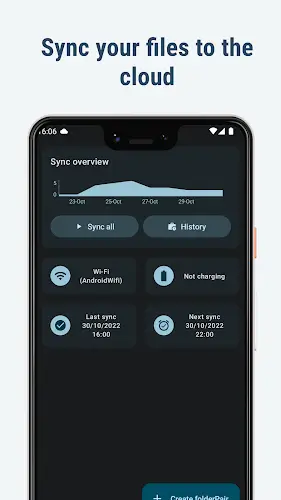
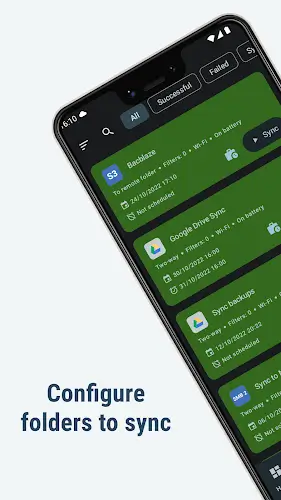
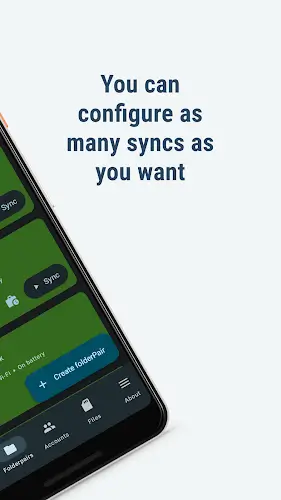
FolderSync turns the typically complex task of syncing files between your device and the cloud into a simple process. You can easily back up photos, music, and important documents from your phone to cloud storage, or restore them to your device. The app's clean, intuitive interface makes syncing straightforward, even for non-technical users. Whether you're protecting precious memories or ensuring your work documents are available everywhere, FolderSync offers a hassle-free solution.
Works with all major cloud services
A key strength of FolderSync is its compatibility with a vast selection of cloud storage providers, meeting everyone's preferences. It works seamlessly with popular services like Amazon S3, Box, Dropbox, Google Drive, MEGA, and OneDrive. This wide support lets you integrate your favorite cloud storage directly into FolderSync, offering unmatched convenience.
Connect using any standard file protocol
FolderSync's versatility isn't limited to cloud services; it also supports a comprehensive set of file transfer protocols for different security and access needs. The app handles FTP, FTPS, FTPES, SFTP, Samba/CIFS/Windows Share, SMB2, and WebDAV. This ensures you can connect to virtually any storage server or NAS device, maximizing compatibility across your entire digital ecosystem.
Built-in file manager with advanced features
The integrated file manager in FolderSync elevates the app beyond simple syncing into a complete file management hub. Here are its core capabilities:
- Copy, Move, and Delete operations: Perform essential file actions like copying, moving, and deleting files on your device or in the cloud, giving you full control to organize your data as needed.
- Local and cloud file management: Manage files seamlessly across your device's local storage and all your connected cloud accounts from one central location.
- Amazon S3 bucket support: Create and delete buckets directly within Amazon S3, a useful feature for users who rely on this popular cloud storage service for projects or backups.
- Organize files across various cloud accounts: Easily organize and manage files spread across multiple cloud storage accounts, such as Amazon S3, Dropbox, and Google Drive, all through a single, unified interface.
- User-Friendly interface: All file management features are accessible through an intuitive interface designed for ease of use, requiring no technical expertise.
- Sync and manage data Effortlessly: The file manager works in tandem with FolderSync's sync engine, allowing you to both synchronize and actively manage your files within one app for a streamlined workflow.
- Fine-Grained Control over Cloud Storage: With direct support for operations like moving files and managing S3 buckets, FolderSync provides detailed control over how and where your cloud data is stored.
Automate sync tasks with Tasker
FolderSync enhances automation through deep integration with Tasker and similar automation tools. This allows for precise control over sync operations, enabling you to create custom triggers and schedules tailored to your specific workflow. This powerful combination lets you fully automate your file management for peak efficiency.
Final thoughts
FolderSync stands out as a powerful and versatile file management tool, providing an intuitive bridge between your local device and cloud storage. Its extensive support for cloud providers and file protocols ensures it meets a wide variety of needs. The inclusion of a capable file manager and robust automation support cements FolderSync as an essential app for anyone looking for a comprehensive sync solution. Whether you're a casual user backing up photos or a professional managing documents, FolderSync delivers a streamlined, user-friendly experience that distinguishes it in the world of file management apps.