






Lightroom Photo & Video Editor

 |
Latest Version | 9.3.0 |
 |
Update | Aug,31/2026 |
 |
Developer | Adobe |
 |
OS | Android 5.0 or later |
 |
Category | Photography |
 |
Size | 124.27M |
 |
Google PlayStore |  |
| Tags: | Photography |
-
Latest Version
9.3.0
-
Update
Aug,31/2026
-
Developer
Adobe
-
OS
Android 5.0 or later
-
Category
Photography
-
Size
124.27M
-
Google PlayStore


 Download(9.3.0)
The Lightroom Photo & Video Editor is a modern application that uses artificial intelligence to simplify and improve your editing workflow. It provides features like instant photo enhancement, artistic bokeh effects, adaptive presets, AI-recommended filters, and accurate masking, which make editing easier. The intuitive interface gives you precise control over photo and video adjustments such as color correction, object removal, video effects, and more. Lightroom also offers a large selection of professionally curated presets and filters, including both free and premium choices. It’s especially strong for quick video editing and reel creation, with tools like edit replays, instant video enhancement, and accurate editing controls. In addition, it includes a professional-grade camera with manual settings, RAW capture, and HDR support to help you take better photos right from the start. Lightroom is a complete solution for anyone wanting to improve their photo and video content.
Save Time with AI-Powered Enhancements
The Lightroom Photo & Video Editor uses artificial intelligence to improve your editing process and help you work faster. Here are some of its standout AI features:
- Instant Photo Enhancement with Auto: Improve your photos with one tap. The Auto setting intelligently tweaks exposure, contrast, and color for balanced, vibrant results.
- Aesthetic Bokeh and Lens Blur: Apply beautiful background blur or artistic lens effects to give your photos a professional, polished finish.
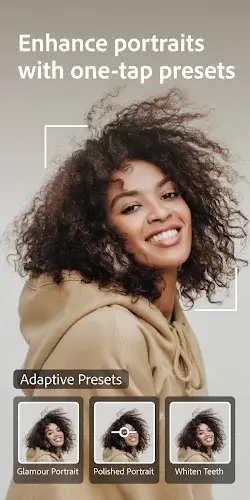
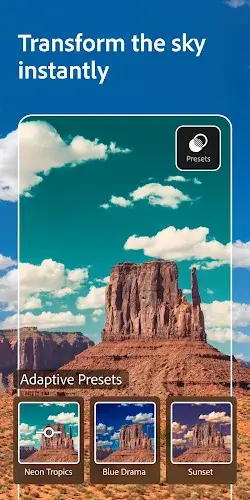
- Adaptive Presets: Quickly transform portraits, highlight subjects, or replace skies using smart presets that adapt to your photo.
- AI-Recommended Presets: Get personalized filter suggestions based on your image, so you spend less time searching and more time creating.
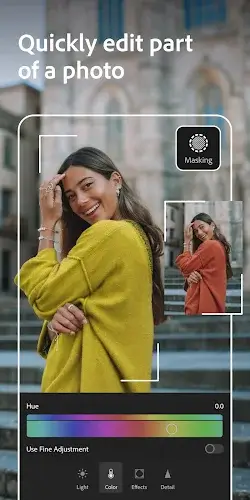
- Precise Masking: Accurately select subjects or skies for targeted edits without affecting the rest of your photo.
- Efficient Image Search: Quickly locate your best shots or search for specific images before you start editing.
Easy-to-Use and Powerful Photo Editor
Lightroom combines simplicity with professional-level control, making it ideal for all skill levels:
- Intuitive Interface: Browse and pick photos or videos easily from your gallery with a clean, fast layout.
- Precise Photo and Video Editing: Use detailed sliders to adjust exposure, highlights, shadows, contrast, curves, and colors for perfect lighting and tone.
- Color Palette Control: Fine-tue colors by adjusting hue, saturation, luminance, and applying color grading effects.
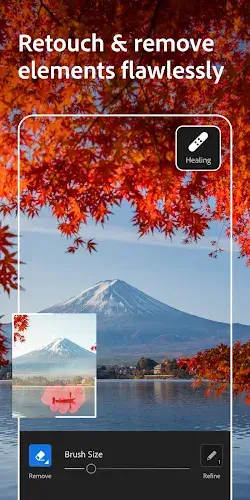
- Object Removal: Clean up photos by easily removing distractions or imperfections with the healing tool.
- Video Effects: Enhance videos with clarity, texture, dehaze, grain, and vignette controls for a cinematic look.
- Crop and Rotate: Adjust framing and orientation to fit social media or print formats effortlessly.
- HDR Photo Editing: Edit and export High Dynamic Range photos to preserve more detail and color depth.
Curated Presets and Filters
Lightroom includes a wide variety of ready-to-use presets and filters:
- Free Presets: Instantly apply free filters and presets to get great-looking photos without manual adjustments.
- Custom Presets: Build and save your own presets to maintain a consistent style across your work.
- Premium Presets: Choose from over 200 premium presets designed by professional photographers and influencers.
Quick Video Editing and Reels Creation
Lightroom also helps you create polished videos and engaging reels:
- Edit Replays: Create before-and-after reels to share your editing process with followers.
- Instant Video Enhancement: Apply presets to videos to keep a uniform style across your content.
- Precise Video Editing: Adjust contrast, highlights, vibrance, and effects with fine-tuned sliders.
- Trim and Rotate: Quickly cut and reorient video clips for a clean, professional presentation.
Pro-Grade Camera
Lightroom’s built-in camera gives you more control while shooting:
- Full Manual Controls: Adjust settings like shutter speed, ISO, and focus manually for better shots.
- RAW Capture: Shoot in RAW format to retain maximum detail and editing flexibility.
- HDR Photography: Capture high dynamic range photos and apply presets in real time for share-ready images.
Conclusion
Lightroom Photo & Video Editor is a versatile and powerful tool for photographers, content creators, and social media users. With its AI enhancements, easy-to-use editor, rich preset library, and professional camera features, it supports every step of content creation. Whether you're editing photos, producing videos, or shooting with the pro camera, Lightroom helps you achieve high-quality results with ease.