






Mixing Station
 |
Latest Version | 2.0.12 |
 |
Update | Sep,03/2026 |
 |
Developer | davidgiga1993 |
 |
OS | Android 5.0 or later |
 |
Category | Tools |
 |
Size | 23.96M |
 |
Google PlayStore |  |
| Tags: | Tools |
-
Latest Version
2.0.12
-
Update
Sep,03/2026
-
Developer
davidgiga1993
-
OS
Android 5.0 or later
-
Category
Tools
-
Size
23.96M
-
Google PlayStore


 Download(2.0.12)
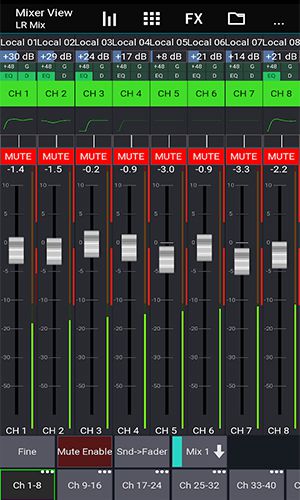
About Mixing Station Experience the freedom of a fully customizable interface. Create unlimited DCA groups (IDCAs), and tailor layers, layouts, channel order, and multi-group labels to your workflow. Enjoy an RTA overlay in PEQ/GEQ view, channel linking with relative ganging, and a gain reduction history for your gate and dynamics processors. Benefit from peak hold on all meters with configurable hold times, a PEQ preview directly in the channel strip, and a high-contrast mode for visibility outdoors. Utilize Popgroups, a comprehensive routing matrix, and support for up to 32 channels per layer. Quickly copy mixes and use feedback detection to efficiently ring out wedges. Access even more powerful features based on your specific mixer model. Discover the complete solution for modern audio mixing.
About Mixing Station
Fully customizable UI
Mixing Station features a fully customizable interface, empowering you to design personal layouts, layers, and channel orders. This puts your most-used controls right at your fingertips for a smoother, more efficient workflow.
Create unlimited DCA groups (IDCAs)
Take control by creating an unlimited number of DCA groups (IDCAs). This is ideal for live sound, allowing you to adjust multiple channel levels simultaneously with speed and precision.
Customizable layers, layouts, channel order and multi-group labels
Organize your session your way. Customize layers, layouts, channel order, and multi-group labels to maintain a clear, logical, and mistake-free mixing environment.
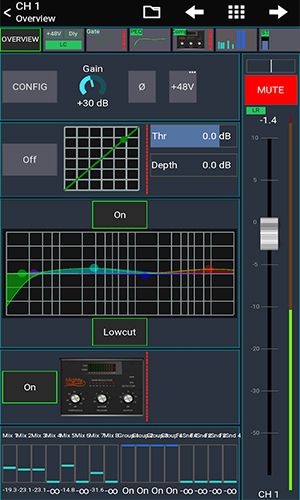
RTA overlay in PEQ /GEQ view
See your sound. The integrated Real-Time Analyzer (RTA) overlay in the PEQ and GEQ view helps you visually identify and correct problematic frequencies with ease.
Channel linking and relative ganging
Work smarter with channel linking and relative ganging. Make coordinated adjustments across multiple channels to maintain consistent levels and parameter relationships effortlessly.
Gain reduction history for gate and dynamics
Fine-tune your dynamics processing with a detailed gain reduction history. Visualize how much gain reduction your gate and compressor have applied over time for more informed adjustments.
Peak hold for all meters, editable hold times
Keep an eye on your levels. The peak hold function for all meters, with user-definable hold times, ensures you never miss a transient or clipping signal.
Peq preview in channel strip
Preview your EQ changes on the fly. The PEQ preview in the channel strip lets you audition the effect of your equalization before committing it to the signal.
High contrast mode for outdoor usage
Mix confidently in any environment. The high-contrast display mode optimizes screen visibility in bright outdoor light, reducing eye strain.
Popgroups
Manage groups of channels instantly. The Popgroups feature lets you assign channels to custom groups that can be soloed or unmuted with a single tap for rapid scene changes.
Routing Matrix
Design complex signal flows visually. The intuitive routing matrix provides a clear overview for sending signals between any channel, bus, or output with total confidence.
Up to 32 channels per layer
Scale your sessions. With support for up to 32 channels per layer, Mixing Station handles everything from simple gigs to complex productions.
Mix copy
Speed up your setup. The mix copy function allows you to duplicate settings from one mix to another, saving valuable time during soundcheck or when creating similar mixes.
Feedback detection for ringing out wedges
Achieve clean monitors faster. The built-in feedback detection tool helps you quickly identify and notch out problem frequencies when ringing out wedges and monitor speakers.
More features available depending on the connected mixer model
Unlock advanced capabilities. Mixing Station offers expanded feature sets tailored to your specific digital mixer, providing deeper integration and control.
Conclusion
Mixing Station is a powerful and versatile mixing application designed to make audio engineering more intuitive and efficient. With its fully customizable interface, unlimited DCA groups, visual RTA analysis, and a comprehensive suite of professional tools, it provides the control and flexibility needed by live sound engineers, studio producers, and musicians alike.