






PowerDirector - Video Editor

 |
Latest Version | 14.0.0 |
 |
Update | Aug,30/2026 |
 |
Developer | Cyberlink Corp |
 |
OS | Android 5.0 or later |
 |
Category | Video Players & Editors |
 |
Size | 164.30M |
 |
Google PlayStore |  |
| Tags: | Video Players & Editors |
-
Latest Version
14.0.0
-
Update
Aug,30/2026
-
Developer
Cyberlink Corp
-
OS
Android 5.0 or later
-
Category
Video Players & Editors
-
Size
164.30M
-
Google PlayStore


 Download(14.0.0)
PowerDirector is a cutting-edge video editing application celebrated for its innovative capabilities and intuitive interface. It excels as both a video editor and creator, highlighted by its revolutionary AI Body Effect that lets users apply dynamic visuals to moving subjects with ease. From a green screen editor to video stabilization and monthly tool updates, PowerDirector delivers a complete toolkit for turning everyday footage into remarkable content. With extras like Anime Photo Templates and an extensive stock library, it meets a wide spectrum of creative demands.
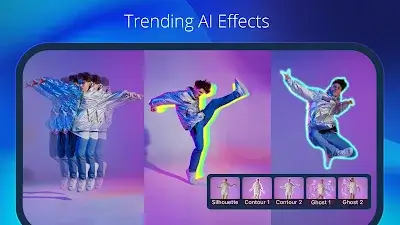
Revolutionary AI Body Effects
PowerDirector's standout feature, the AI Body Effect, marks a major advancement in mobile video editing. This innovative technology enables users to effortlessly apply striking visual effects that wrap dynamically around moving figures. It eliminates tedious manual tweaking, saving time while allowing creators to achieve studio-level polish. With AI Body Effects, PowerDirector makes it simple for anyone to produce professional-quality videos—demonstrating the app's dedication to pushing the limits of mobile editing technology.
Diverse Anime Photo Templates
PowerDirector’s Anime Photo Templates bring a fun, creative twist to video projects. Users can easily transform themselves into cartoon characters by selecting a template, importing clips, and letting anime-inspired effects, transitions, and music turn their footage into vibrant animated creations.
Powerful Pro Video Editor
PowerDirector’s Pro Video Editor gives you the power to turn everyday videos into standout moments. This all-in-one video maker includes a green screen editor and video stabilizer, along with a growing suite of powerful tools updated monthly. From crafting slow-motion clips to building video collages, PowerDirector delivers the features you need to bring your creative vision to life.
Precise Video Editing & Enhancement
PowerDirector streamlines video editing with intuitive controls. Trim, cut, splice, and rotate clips with simple taps. Fine-tune brightness, color, and saturation for optimal visuals. Add stunning effects and transitions using drag-and-drop simplicity. The multi-track timeline lets you combine photos and videos, while text and animated titles can be added in seconds. Create polished video and photo collages with customizable overlays for even more creative flexibility.
Additional Advanced Features
With a rich set of tools and content, PowerDirector makes video editing accessible to creators of all skill levels. Notable features include:
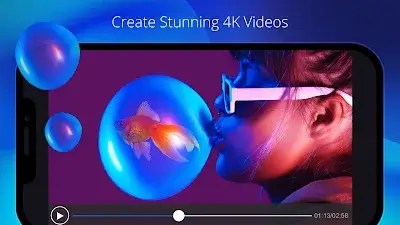
- Edit and export videos in up to 4K resolution.
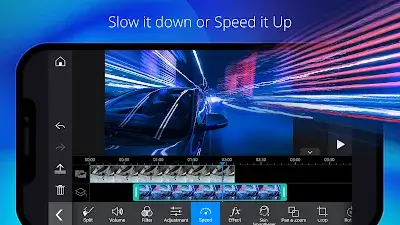
- Control video pacing with adjustable speed settings.
- Smooth shaky footage with the video stabilizer.
- Enhance lighting and color using adjustment layers.
- Create engaging openings with animated titles.
- Experiment with audio using the voice changer effects.
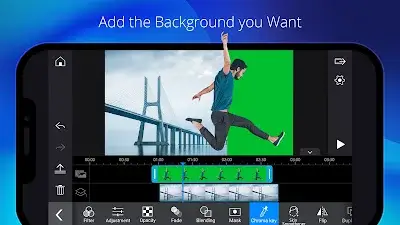
- Remove backgrounds easily with smart cutout or use chroma key for green screen replacement.
- Apply keyframe controls for precise adjustments to transparency, rotation, position, and scale in picture-in-picture and mask effects.
- Craft double exposure visuals with video overlays and blending modes.
- Share your videos directly to YouTube and Facebook to showcase your work with the world.
Conclusion
PowerDirector is more than just a video editor—it’s a complete video creation suite designed for all types of creators. With ongoing innovation and a focus on powerful yet easy-to-use tools, the app has established itself as a top choice for elevating video projects. Whether you're just starting out or are a seasoned pro, PowerDirector stands ready as your creative partner in the dynamic world of video production.