






Stella Sora: Ultimate Reroll Guide for Beginners
Stella Sora is Yostar's latest action RPG, offering an exciting mix of top-down exploration, dynamic combat, and a roster of collectible heroes called Trekkers. These charming characters are beautifully rendered as chibi-style sprites, each with unique expressions and abilities. As with many gacha games, your initial summons can greatly influence your early progress, making rerolling a key strategy for players seeking a powerful start.
Why Reroll in Stella Sora?
Rerolling involves restarting the game to repeat your early summons until you secure high-tier characters. This practice is common in gacha titles, and Stella Sora is no different. While it requires some patience, it ensures you begin your adventure with a formidable team.
Your starting team in Stella Sora can dramatically impact how easily you advance through the story. Acquiring a strong 5-star Trekker early simplifies battles, accelerates your progress through initial content, and sets a solid foundation for long-term success. With launch banners and free summons often providing generous opportunities, rerolling during the early period is an excellent way to optimize your account. Consider it an initial time investment that saves effort later.
How Rerolling Works in Stella Sora
Ultimately, rerolling in Stella Sora focuses on securing a powerful 5-star Trekker as soon as possible. To understand the process, it's essential to know the summoning rates. Here are the base rates for recruiting characters in Stella Sora:
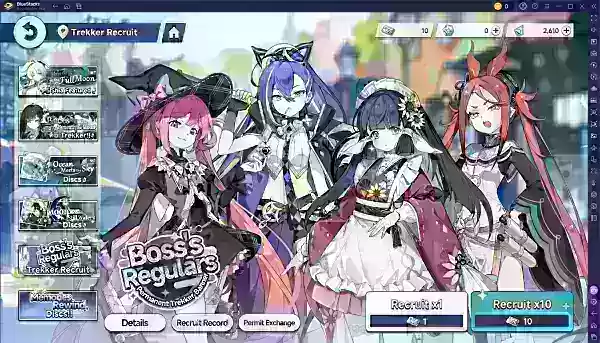
Reroll Faster in Stella Sora Using BlueStacks
If you're playing Stella Sora on a PC or laptop, BlueStacks and its features can significantly speed up your rerolling. This is achieved through the platform's "Multi-Instance Manager." First, download and install the game on a specific BlueStacks instance, and designate it as your master instance.
Next, clone this master instance multiple times based on your system's capability. Using the synchronization feature, you can control all instances simultaneously to perform multiple rerolls at once. If a set of rerolls doesn't yield your desired characters, simply delete the cloned instances and create new ones from your clean master instance.
Playing Stella Sora on BlueStacks also lets you enjoy the game on a larger PC or laptop screen with the precision of a keyboard and mouse.
-
 Mar 17,25All Split Fiction Achievements & How to Unlock Them Dive into the captivating co-op adventure Split Fiction from Hazelight Studios! This guide outlines every achievement, ensuring you and your partner conquer every challenge. While some trophies are earned naturally through the story, many require thorough exploration and unique actions. Use this g
 -
 Apr 05,25Balatro Cheats: Accessing the Debug Menu Guide Balatro took the gaming world by storm upon its release in early 2024, selling over 3.5 million copies and clinching three out of five nominations at the 2024 Game Awards. Its innovative gameplay and endless replayability have kept it a favorite among players. As players become more adept at its mec
 -
 Jan 16,25Girls' Frontline 2: Exilium Tier List Released Another free-to-play gacha game, another character ranking to guide your investment choices. This Girls’ Frontline 2: Exilium character tier list helps you prioritize which characters are worth your resources. Girls’ Frontline 2: Exilium Character Tier List Here's a breakdown of currently available
 -
 Apr 09,25"Top 11 Minecraft Alternatives to Play in 2025" Minecraft has captivated gamers around the globe, becoming one of the best-selling games ever. But what if it's not quite your cup of tea? Or perhaps you're a die-hard fan looking for more experiences in the same genre? We've curated a list of the 11 best games similar to Minecraft that you can dive